class: center, middle, inverse, title-slide # Beautify your R code ## 💅💄💇 💻 ### Saskia Freytag ### 2019/05/07 --- class: inverse .animated.shake.infinite[ ] --- class: middle .pull-left[ ###😢 ```r if (y < 0 && debug) message("Y is negative") if (y == 0) { log(x) } else { y ^ x } ``` ] .pull-right[ ###😊 ```r if (y < 0 && debug) { message("Y is negative") } if (y == 0) { log(x) } else { y ^ x } ``` ] --- # So what encompasses code style? - Names e.g. for functions 😢 `addition()` 😊 `add()` - Spacing e.g. for indexing 😢 `x[, 1]` 😊 `x[,1]` - Indenting e.g. 😢 tabs 😊 2/4 spaces - Organization e.g. 😢 loading libraries sequentially 😊 load all libraries at the start - Documentation e.g. 😢 commented code 😊 use comments to record important findings and analysis decisions --- class: inverse, center, middle  --- class: center # Why care? .pull-left[ - provides consistency - makes code easier to read - makes code easier to write - makes it easier to collaborate ] .pull-right[ _Good coding style is like using correct punctuation. You can manage without it, but it sure makes things easier to read._ Hadley Wickham, Chief Scientist RStudio ] .center[ **However all style guides are fundamentally opinionated.**]  --- # Different style guides ### The Known - [**tidyverse**](https://style.tidyverse.org/) style guide _most comprehensive, underscore for naming conventions_ - [**Advanced R**](http://adv-r.had.co.nz/Style.html) style guide _fairly comprehensive, underscore for naming conventions_ - [**Google**](https://google.github.io/styleguide/Rguide.xml) style guide _first of its kind, camelCase for naming conventions_ ### The Esoteric - [**Jean Fan @jefworks**](https://jef.works/R-style-guide/) style guide - [**Bioconductor**](https://bioconductor.org/developers/how-to/coding-style/) style guide --- class: bottom, inverse background-image: url(https://robertkaplinsky.com/wp-content/uploads/2014/08/zoolander_center.jpg) # What the f*ck, do I have to read? ###Hell no --- # R's little stylists ### tidyverse - [**lintr**](https://cran.r-project.org/web/packages/lintr/index.html) performs automated checks to confirm that you conform to the style guide. - [**styler**](https://cran.r-project.org/web/packages/styler/index.html) allows you to interactively restyle selected text, files, or entire projects. It includes an RStudio add-in, the easiest way to re-style existing code. ### Advanced R - [**formatR**](https://cran.r-project.org/web/packages/formatR/index.html) was designed to reformat R code to improve readability; reorganizing long lines of code, addition of spaces and indents, cleaning if else statements, etc. --- # Using lintr Let's look at some bad code saved in a script called `bad.R`: ```r feet=c(12,11,12,18) inches=c(4,3,2,1) average<-mean(feet/12+inches,na.rm=TRUE) ``` ## Can you name two stylistic mistakes? --- # Using lintr Let's run the function `lint` on the `bad.R` script: ```r library(lintr) lint("bad.r") ``` This is the output: <img src="Beautify_R-figure/lintr.png" style="width: 50%" /> --- # Using styler Install `styler` and head to `Tools -> Addins -> Browse Addins -> style active file` or: 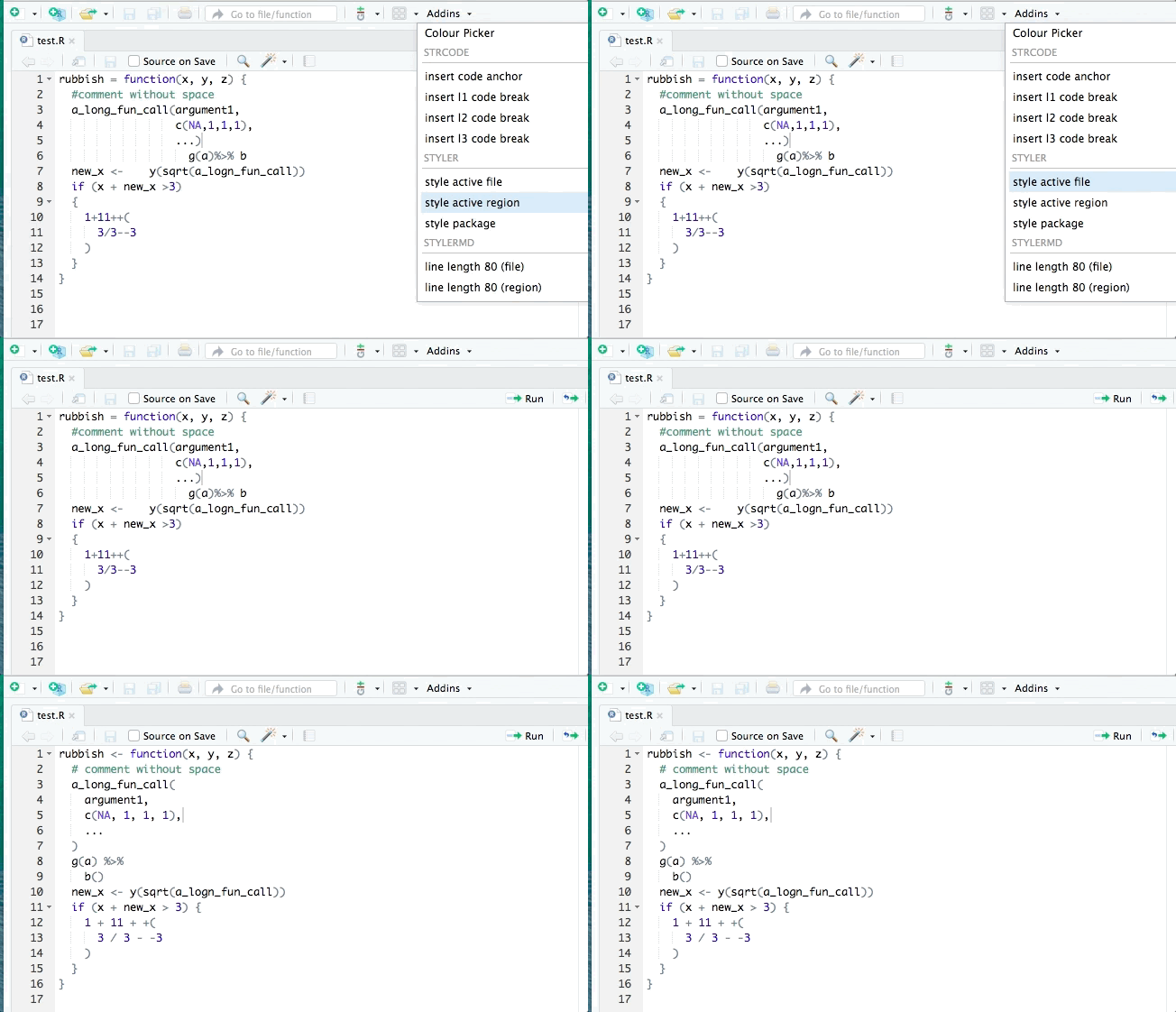 --- # Using styler Remember `bad.R`: ###😢 ```r feet=c(12,11,12,18) inches=c(4,3,2,1) average<-mean(feet/12+inches,na.rm=TRUE) ``` After application of `styler:::style_selection`: ###😊 ```r feet <- c(12, 11, 12, 18) inches <- c(4, 3, 2, 1) average <- mean(feet / 12 + inches, na.rm = TRUE) ``` --- # RStudio can also help <img src="Beautify_R-figure/reformat.png" style="width: 80%" /> After application: ```r feet <- c(12, 11, 12, 18) inches <- c(4, 3, 2, 1) average <- mean(feet / 12 + inches, na.rm = TRUE) ``` --- # RStudio can also help .pull-left[ Adjust tab-space conversion width: <img src="Beautify_R-figure/editing1.png" style="width: 90%" /> ] .pull-right[ Insert margin at 80 characters: <img src="Beautify_R-figure/editing2.png" style="width: 90%" /> ] --- class: inverse, bottom background-image: url(https://media.giphy.com/media/1jX9We5NSZNZdBUcwW/giphy.gif) # Still not good enough? ## Ask a friend to do a code review! --- class: middle, center # My experience <img src="Beautify_R-figure/cc-hex-blue.png" style="width: 50%" /> Find credibly curious where ever you get podcasts or soundcloud! --- class: center, middle # Thanks! Slides created via the R package [**xaringan**](https://github.com/yihui/xaringan). The chakra comes from [remark.js](https://remarkjs.com), [**knitr**](http://yihui.name/knitr), and [R Markdown](https://rmarkdown.rstudio.com).